Calibrate your Vidda / Hisense projector yourself
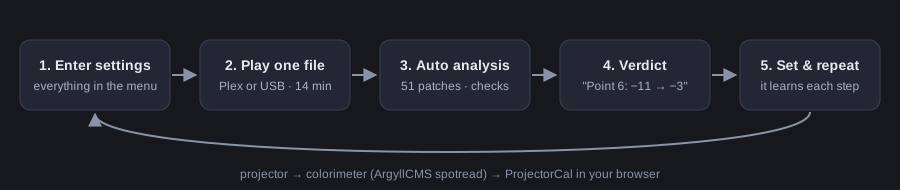
ProjectorCal is a free, open-source program that measures your projector with a colorimeter and tells you exactly which menu values to set — white balance Gain/Offset, gamma control points and CMS. Play one video from a USB stick or Plex, leave the room, read the verdict, set the values, repeat. Usually 3–6 runs.
- Projectors: Vidda C3S (verified), C3 / C3 Pro / C3 Ultra, Hisense C2 / C2 Pro / C2 Ultra, C1, PX1 / PX2 / PX3, Hisense laser TVs, any display with a Gain/Offset white balance and CMS.
- Meters: any ArgyllCMS instrument — i1Display Pro, Calibrite Display Plus HL / ColorChecker Display, ColorMunki Display, SpyderX / Spyder5, i1Pro, Klein K10.
- Computer: Windows 10/11 (beta), macOS or Linux. Runs locally in your browser, offline, no account.
Download the latest release · Source code on GitHub
Start here
- Beginner’s guide — step by step
- Supported projectors and meters
- FAQ and troubleshooting
- Case study: Vidda C3S from factory Filmmaker to gray ΔE ≈ 1
- How it works (formulas, tolerances, algorithms)
What a result looks like
On a Vidda C3S with a Calibrite Display Plus HL: gray ΔE2000 ≈ 1.0, gamma 2.40 ± 0.02 on every step from 10 % to 95 %, weighted color ΔE ≈ 1.7, contrast ≈ 1350:1 — in seven runs from the factory Filmmaker mode.
Why this works on any model
ProjectorCal doesn’t rely on a database of “best settings” copied from another unit. It measures your projector, suggests a change, measures again and learns how far one step of each control really moves the picture. Every unit and firmware is different; the measurement is what counts.
Русский: краткое руководство на русском.